
Connect with Exhibitors, Build Your Agenda
SEMICON West 2026 Mobile App
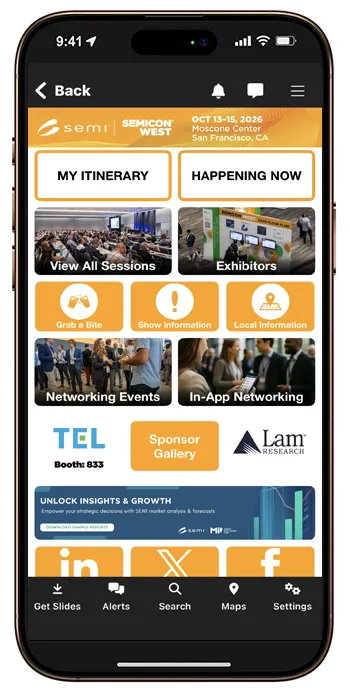
Maximize your SEMICON West experience with the official mobile app. Build your schedule, discover sessions, connect with attendees, and navigate the event with ease.


Already have the SEMICON West app? Open it and select the 2026 event. Update the app through your app store if prompted.
Build your agenda before you arrive
For a closer look at the full program, start on your computer. Sign in to the SEMICON West 2026 Session Catalog to browse sessions and build your personal agenda. Sign in to the mobile app with the same account, and your saved schedule will be there when you’re onsite.
You can also add or change sessions in the app as your plans evolve.
Explore the show
- Browse exhibitors and save the ones you want to visit.
- Use floor plans to locate exhibitors and navigate Moscone Center.
- Find show information, including registration hours, transportation, food options and onsite services.
Connect and stay informed
- Create your profile to connect with other attendees.
- Turn on notifications for timely show updates.
Additional Guidance
The mobile app is available only to registered attendees of SEMICON West 2026. Log in using the email address you used to register and your Badge ID. You can find your Badge ID in your registration confirmation email or by signing in to your registration record.
On Your Registration Confirmation Email
Sent from "[email protected]" after registering for SEMICON West. Search in your spam box if unable to find.
Login to Your Registration Record
On the confirmation page, you will find your Badge ID and confirmation of the email address used to register. Login Here
Select "Favorite" next to the star icon on the agenda item. When you select "MY SCHEDULE" from the Home Screen that session will be listed.
Additionally, you can login to the Online Agenda (also using your registered email address and badge ID) to create your custom agenda (select the star next to the agenda item) that will populate in the Mobile App "MY SCHEDULE" feature as well.
Select "Exhibitors" from the Home Page and see the lists or floor plan. Select the "Favorite" (star icon) next to any exhibitor you wish to visit. You are able to take notes or mark visited as you go to each of your preferred solution providers.